
Git报错: Failed to connect to github.com port 443 解决方案
01-git2026/11/14
两种情况:
- 自己有vpn,网页可以打开github。说明命令行在拉取/推送代码时并没有使用vpn进行代理
- 情况没有vpn,这时可以去某些网站上找一些代理ip + port
针对第一种情况,解放方法如下
配置http代理Windows、Linux、Mac OS中git命令
配置socks5代理
git config --global http.proxy socks5 127.0.0.1:7890
git config --global https.proxy socks5 127.0.0.1:7890
配置http代理
git config --global http.proxy 127.0.0.1:7890
git config --global https.proxy 127.0.0.1:7890
解读:
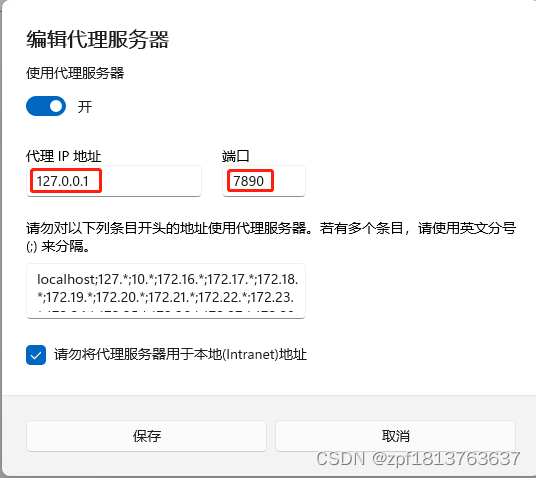
- 命令中的主机号(127.0.0.1)是使用的代理的主机号(自己电脑有vpn那么本机可看做访问github的代理主机),即填入127.0.0.1即可,否则填入代理主机 ip(就是网上找的那个ip);
- 命令中的端口号(7890)为代理软件(代理软件不显示端口的话,就去Windows中的代理服务器设置中查看)或代理主机的监听IP,可以从代理服务器配置中获得,否则填入网上找的那个端口port
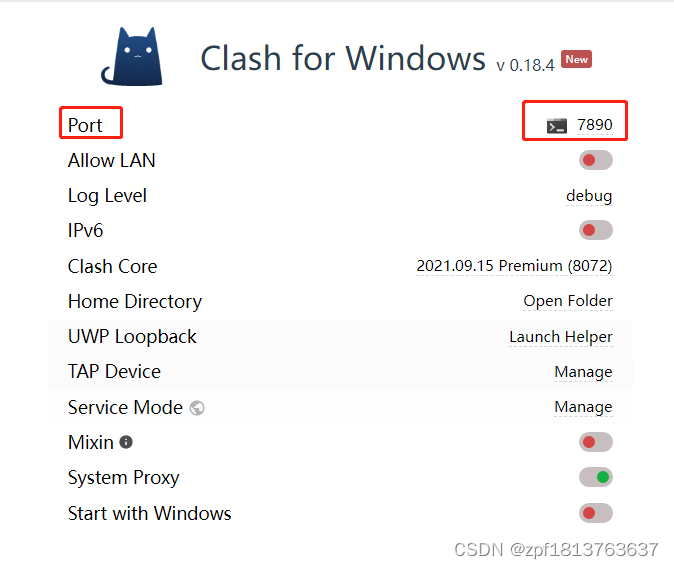
socks5和http两种协议由使用的代理软件决定,不同软件对这两种协议的支持有差异,如果不确定可以都尝试一下
主机号和端口号可在代理的位置查看(自己有vpn的需要查看)
查看代理命令
git config --global --get http.proxy
git config --global --get https.proxy
取消代理命令
git config --global --unset http.proxy
git config --global --unset https.proxy